Uncle Kevin's Unillustrated Guide to Spec-Driven Development
Before I get started, I feel compelled to provide a definition for vibe coding. What I’m doing is not vibe coding. Vibe coding is using an AI assistant in an informal and unspecified manner to rapidly build and prototype non-production solutions. The more structure and discipline you introduce to your AI-assisted SDLC, the less “vibey” it is.
This post, and hopefully those that follow it before my inspiration runs out, is an experience log and pattern and practice guide for AI-assisted development. My journey started with an idea that I had never before turned into code before, so that felt like a great starting place.
Agentic Realms
Agentic Realms is the sample application that I’m building on this journey.
Agentic Realms is a re-imagining of the classic MUD multiplayer text adventure where players interact with the world (mostly) through text. Instead of parsing the player’s intent like get sword, the idea is to use an LLM to convert natural language intent into strictly formatted commands. This lets someone type pick up the sword or grab the sword from the shelf and have them both mean the same thing at a data level. Wizards utilize AI as well, where the game converts natural language into an intent to build or create. Players risen to the rank of wizard don’t have to know how to code or write JSON or YAML. They can type phrases like when the player wields the sword, they gain 10 hit points and everyone in the room sees it glow.
The Problems with Direct-Prompt Coding
It’s really easy (perhaps too easy) to sit down, fire up Claude1 Code, and ask it to write you an app. The gratification time is fast, the feedback loop is the shortest it’s ever been, you can play with prototypes even as it codes the next components… it’s magical. And that’s kind of the problem.
In software development circles, especially among senior engineers who have ruined things in epic fashion multiple times, the word magic is a very bad word. If something is magic in your system, then it works without anyone knowing why or how. People don’t know how or when that magic is going to break, only that failure is inevitable.
The longer you sit in a session when you’re building things directly from the prompt, the more dangerous it gets. You run the risk of losing valuable information due to compaction or just having too much context. You lose (or may have never had) access to the rationale behind the decisions made. Worse, you probably lose the record of decisions entirely.
You have to use the prompt to dictate things that you’d rather be automatic. You have to specify coding style, patterns to avoid, patterns to embrace, and any other caveats and rules you have. Sure, you can encode your own coding philosophy into the AGENTS.md or CLAUDE.md file, but once your context gets too big, even that information can be disregarded.
Build me a web application written in React with a Node.js server
that implements a TODO system. You can create, update, delete,
and edit TODO items and check them off as complete.
Use (some cloud DB provider) to store the TODOs.
This prompt looks harmless but that’s why it’s so dangerous. It has a huge, rapid payoff. Near-instant gratification. It probably won’t take an asisstant very long to build this. If you review the code at all, it’s probably pretty harmless. This isn’t going to be a real, production-grade, customer-facing application anyway.
You cannot use this model to build real software for real customers in the real world.
Imagine that you did deploy this as your MVP, with the idea that you’ll just keep building on it until you have a fully functioning Kanban board or project management application. Building this way makes each coding pass an isolated thing that lacks cohesion with the code that came before it.
You don’t know why things are the way they are. Worse, you don’t know if something works the way it does because you wanted it to do that, or because the agent inferred that’s what you wanted. Without the in-brain institutional knowledge of having built this application the “traditional” way, it becomes a giant meatball gathering more and more dirt and debris as it rolls down hill. Once it hits the bottom, it’s an unrecognizable monstrosity.
It’s Time to Write a Spec
At this point, we should be thinking that we need something a bit more formal. We need to track what we wanted, why we wanted it, and how we wanted it done. This shouldn’t be just some casual conversation I’m having with my agent. This time I need real work and real accountability. I need to be able to ask my (or any other) agent if the implementation isn’t exactly what I asked for.
Build an application that meets the specification I've written
in the spec.md file
Now we’re cooking with hot grease. This gives me a lot of good vibes (see what I did there?). I can be precise and include detailed descriptions of what I want and how I want it to be architected. In my fabulous new spec.md I will dictate the tech stack and architectural concerns and solutions. I’ll describe all of the features. I’ll describe all of the ways in which the application can be tested to verify that it meets my specification.
I’ve done this very thing many times. I was getting pretty good at being able to rapidly churn out spec.md files and guide agents through the development process. With a specification in place, I now have an official (and versioned!) record of exactly what I wanted my application to do. If I change my mind, or I want to add features, I add them to my spec.md file and tell the agent to build that new feature.
My new development loop involved starting with a specification and jumping into the build phase. I’d watch the agent build according to my spec. When the agent got something wrong, I would make my specification more precise. Rather than just typing “fix this”, I’d re-do the generation pass based on the new spec. This gave me confidence and predictability from something that is inherently random.
Things I noticed I was doing a lot that could use improvement included making changes to the spec over and over based on bad code. I knew I needed something between the spec and the code that could catch inconsistencies and potential gaps in the spec.
I started using a second assistant to look at my spec and try and find potential gaps or areas where it looked like code generation might fail. That’s when I got the idea to use a prompt to build my specification, rather than starting with the spec file.
Write Prompts to Build Specifications
Once I reached this point, it felt like I was getting close to an AI-supported development process that I could use going forward.
Write me a specification for a TODO application using common
conventions for applications like this. It should support the
standard CRUD functionality for TODOs.
Users should be able to check items as done.
This looked great. After it generated my spec.md file, I would have the agent review its own specification.
Identify any gaps or inconsistencies in the specification
that might result in too much ambiguity to implement without
additional clarity from the developer. Look for specification
elements that might conflict with one another.
Identify areas where not enough technical information
was supplied to properly generate code.
Adding this clarification and review step to my process dramatically reduced wasted time (and tokens). I could very rapidly iterate on the specification, knowing that when I was finally satisfied with the result and the agent was no longer throwing up red flags I could get the right result.
I knew I’d still have to review the code and that I might have to make changes afterward, but I was much more confident in the work product now that I had a specification to work from.
But I still needed a few more things. There were steps and prompts and phrases that I wanted to automate so that I could have a more formal process to go from prompt -> spec -> code.
Building a Formal Process Around Prompt-Driven Specs
The act of using a prompt to build and review a specification was forcing me to confront parts of my ideas that I hadn’t fully thought through. This process wasn’t just making my generated code more predictable, it was actually making for a better product. At this point I’d probably built 5 or 6 full products this way, including some that are still running today2.
I knew that I still needed a bit more discipline around how I was building applications. My newer, more formal process was the following loop:
- Rules and style guide (defined globally for the project)
- Feature specification (
spec.mdbuilt by the agent via prompts) - Iterate, refine, and clarify the feature spec
- Generate the code from spec according to my tech and architecture guidelines
By adopting this approach, I was now defining specifications per feature and not per application. This kept my context and memory requirements low and kept the agent from getting confused (usually). Before I ever told the agent to generate the code, I was in a really good place in terms of my concept of what I wanted to build, how I wanted it built, and what it would look like when it was done.
The specification was the artifact.
At this point, I’d stopped considering the code to be the important thing. The code was now disposable, and the thing that mattered was my rules, guidelines, and specifications.
Issue-Driven SDD
One thing you may have noticed if you’ve gone down this rabbit hole before is that the text you originally typed in the prompt to produce a spec is never preserved word-for-word. Typically you’ll see a summary of that prompt in the top of the spec. What I want is a clear and accurate record of the prompt I used to start the whole process from spec to code. This is when I start by creating a Github issue. I’ll put the prompt there, and when I need to create a specification, I might type something like:
Create a specification based on the contents of issue 5Whether or not to dangle all of the SDD artifacts from a Github issue seems to be controversial. I like it, because it makes it easier for collaboration and it gives me the traceability backwards from spec to the prompt that produced it. When I start this way, I also usually have the assistant summarize each of my steps as a comment on the issue. Once that list of steps grows and becomes more disciplined (as you’ll see with Spec-Kit), then having the issue as an anchor becomes even more useful.
One pretty common alternative to using the Github issue as an anchor is people have built TODO-style applications or agent rules that manage workflows. It’s definitely up to you and your team to figure out what works best.
Introducing Spec-Kit
Unsurprisingly, I was not the only person working on building a better process for AI-supported development. Github was doing the same thing. They’ve come up with a formal process called spec-kit. Spec-kit codifies decades of development experience into a set of templates and rules for a spec-driven process.
You certainly don’t have to use this process, but I’m convinced that you must use a process. Winging it, using YOLO mode, or “just vibing” is no basis for a system of development. Just like strange women lying in ponds distributing swords is no basis for a system of government.
That’s right, I said it. Vibe coding is the farcical aquatic economy of AI-assisted development. As much as we all love to complain about process, a process that forces you to confront the weakest points in your ideas and think extra hard about what you’re doing is a good thing™.
Writing my First Feature Spec
I’d learned my lesson from building applications with nothing but a single spec.md file. I’d also used spec-kit to build a few applications (again, some are “real” and running despite what the trolls say). This time for the Agentic Realms game, I knew I was going to have to build it feature-by-feature over time. I knew that my ideas on what I wanted were also going to change based on my interactions with the foundational features, so I had to keep each feature and its spec small and discrete.
To get the prompt started, I told /speckit-specify (the Claude plugin for spec-kit) that I wanted an interface that worked according to my rules that looked and felt like a Claude Design project. Claude design actually gives you a URL that you can use to “hand off” your design work to Claude Code when you’re ready to make things real.
The first feature I specified was the core look and feel and design language of the website. The specification that I came up with has the following user stories in it (these are all done with mock data):
- Player views game world
- Player interacts with HUD cards
- Player uses Map and Input controls
- Wizard edits room content
- Wizard edits item content
- Wizard edits NPC content
- Wizard edits Quest content
- Wizard manages triggers
- Player view layout variants
As you’ll see if you have the patience to bear with me on this journey, not all of these ideas survived intact. However, by creating this feature that built a fully functioning Elixir Phoenix web application in the graphical style of my Claude Design output, I was able to poke and prod and interact with my concepts.
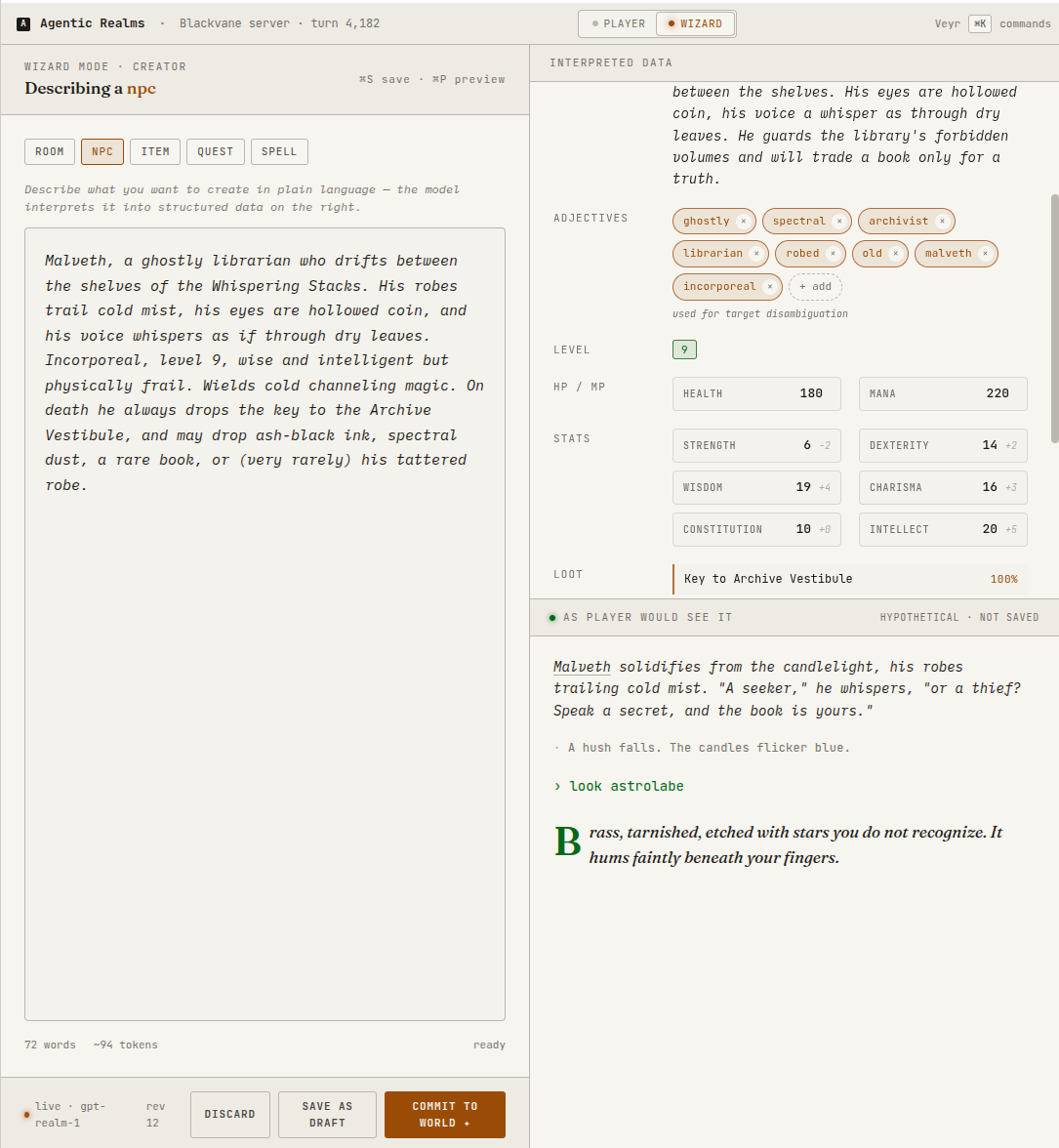
This “physical” access to my designs made me change my mind about a number of things that would get rolled into subsequent features.
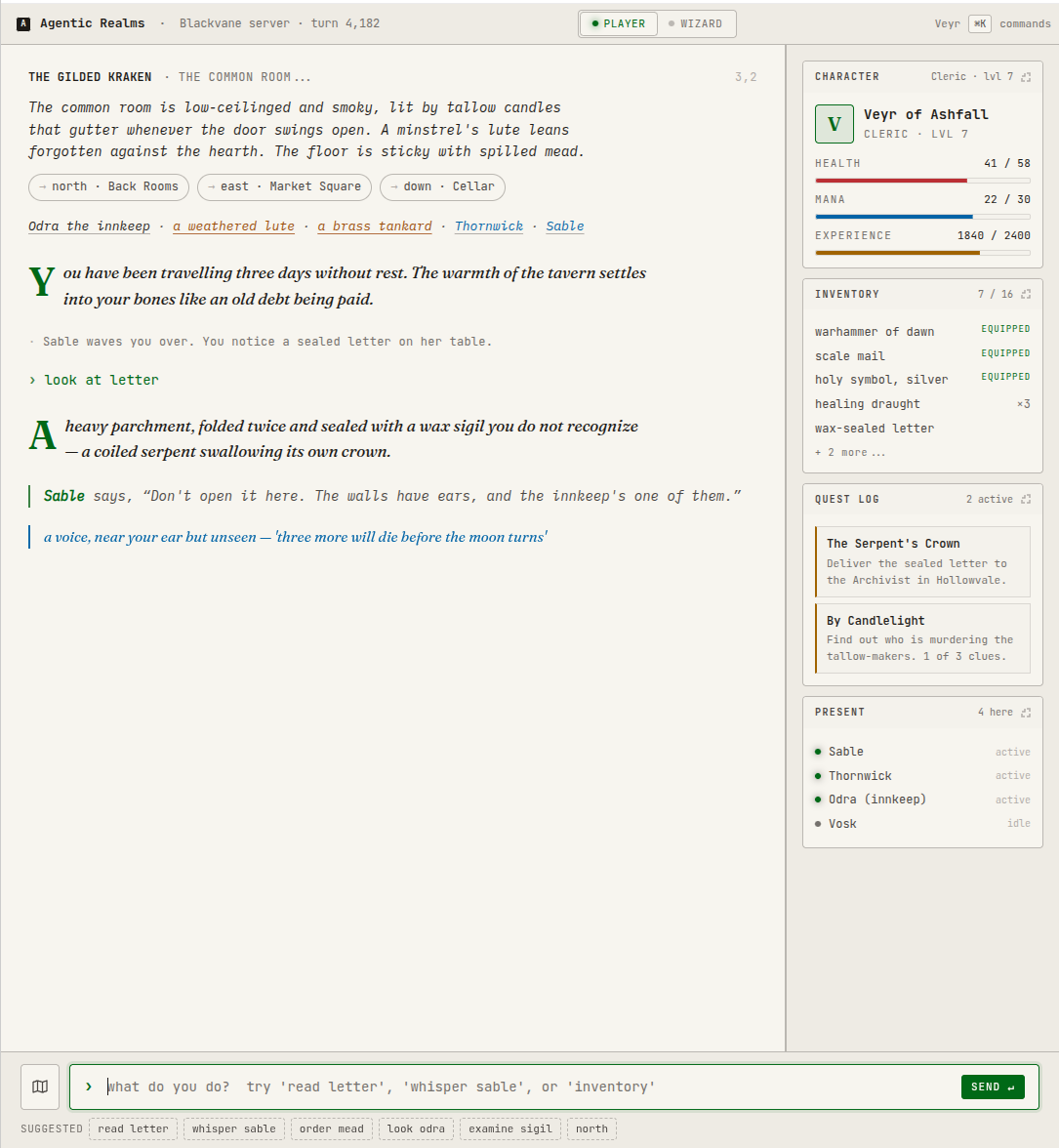
If you’ve ever used Phoenix LiveView, then you know how annoying it can be to convert someone’s design mockup (even if it’s in raw HTML) into a good, reusable layout of controls and styles. Claude had no trouble with this using my Claude Design handoff as a part of the specification prompt.
Post Codegen Discipline
Even when using spec-driven development, we still have work to do after the code is generated. I typically give it a quick once over after I’ve smoke tested the feature that was just generated (even though Claude always generates tests for everything according to my constitution). But then I also ask Claude to review things after it’s “Polish” step. Most of the time it picks up minor nits, but occasionally it finds a discrepancy between the generated code and the official spec.
What’s Next
Next, I’ll spend more time talking about the game and my specification than I do about the Spec-Driven Development (SDD) process in general. The next thing I specified as a feature was user authentication and creation. It felt like, after the UI, being able to log in was the next most important thing.
Footnotes
I use Claude Code here out of habit and to make the writing smoother, but replace this with Codex or Copilot or whatever assistant you’re using. ↩
The internet trolls demanded that I show source code to back up my claim that I’d been doing spec-driven development. It’s funny how no one thinks closed source is a thing anymore. ↩