Running My Agentic NPC Brains on Temporal
While I love curling up with a good book or documentation site to learn something new, there’s no substitute for getting my hands dirty and building something tangible with thing I want to learn. I was going through my backlog of products that have a free trial to explore when I got to Temporal.
At the time, I really didn’t know much about the product other than the fact that it was a “durable workflow” execution engine. Since then, I’ve found that it’s got quite a bit more than just the basic workflow execution piece.
I’ve been building an online game inspired by the MUDs of yore, called Agentic Realms. This game is a reimagining of the classic multi-player text adventure genre by applying AI where it makes sense (and not just slathering it everywhere for AI’s own sake).
Up until this point, I had NPCs that could emit “idle actions” like an innkeeper randomly wiping down a bar every few minutes. This was just a random activity that’s defined explicitly in the NPC’s metadata. I wanted to give my NPCs better “intelligence”, so I brainstormed about where it made sense for an NPC to consume an LLM.
“What if the NPCs made a decision about what to do on a timer and that decision was based on their lore, description, and even memorable events in recent history?”
I asked myself this question. It seemed like a really good use of models and the decision making logic would certainly be easy enough to get Haiku to answer, and would also probably work against a local Ollama model as well. Haiku is a lightweight, fast, and relatively cheap model and I’ve been using it to great effect already in the game for intent parsing.
NPCs that would make decisions based on their lore (which is stored as data and not code) and memorable events sounded pretty amazing. Imagine an NPC just walking through a forest minding his own business when he sees a player who has attacked him recently. His lore says that this NPC holds a grudge, and so he decides to exact his revenge against the player. The decision about what to do comes back from a planning agent. Awesome.
When I designed the pure-Elixir version of this feature, I was going to spawn a GenServer for each running NPC. This would allow each NPC to have its own private state that could be used in building the user prompt for the LLM. I also planned on benchmarking that against having a single GenServer that handled all of the NPCs in a loop.
I decided to let each NPC in the game be managed by a long-running, agentic workflow in Temporal. Unlike so many other frameworks, with Temporal you build, deploy, and run your own code. You don’t ever send them your code or release artifacts. Your code communicates with a Temporal server, which can be hosted locally or in their commercial cloud.
My design: Have a timer-fed GenServer in the Phoenix application perform a sweep that collects the list of running workflows from the Temporal server and does a diff against the list of NPCs in the game. From this diff list, it will shut down Temporal workflows for no-longer-running NPCs and it will start up a Temporal workflow for each NPC that needs one. Starting and stopping are idempotent so the logic here is pretty simple. It’s more like “waking” than activating.
Next would be a Rust (yes, that language I used to write in all the time) application. This app holds the code that defines my NPC workflow and all of the activities it can perform. Temporal is very opinionated (with good reason) about when and where code needs to be pure versus side-effecting. If it’s side-effecting or non-deterministic, it has to go in an activity.
The first version of my NPC brain is pretty simple. When it first starts it will fetch its identity and lore from a new /api endpoint on the Phoenix application. It caches that information for the rest of the life1 of the workflow.
On a timed loop (defaults to 60 seconds), the workflow uses an activity to fetch the NPC’s current surroundings. This includes the nearby NPCs and players, as well as objects and the description of its current environment (room). After the surroundings are fetched, it then runs a plan activity that takes the lore, metadata, and surroundings information and comes back with a JSON object like {"intent": "move", "direction": "south"}. I only support move now but it’s a well-defined, easy process to add more tools the agent can use.
Let’s look at my Rust workflow. This is just regular Rust running in a regular main that uses the Temporal SDK to poll the work queue.
The first thing to notice is the let identity = ... expression. This is the NPC’s lore and we get it from a query activity called load_identity. What’s not in this code is anything that looks like it’s storing or retrieving or caching the identity variable. This variable will remain valid until the run function terminates (which is when the NPC finishes its workflow).
Under the hood, Temporal can suspend and save your workflow and then when it needs to do work (e.g. timer fire) it’ll replay the workflow history to get caught up (I’m over-simplifying a bit for brevity’s sake). Since the results of an activity are a cached side-effect, that’s “just state” that comes with the workflow. Now the payoff for the constraints around side-effects pays off.
#[run]
pub async fn run(ctx: &mut WorkflowContext<Self>,
    input: NpcInput) -> WorkflowResult<()> {
let entity_id = input.entity_id;

// Identity: fetched once (retry until available); held for the mind's life.
let identity = match input.identity {
    Some(identity) => identity,
    None => ctx
        .start_activity(NpcActivities::load_identity, entity_id.clone(), opts(15, 0))
        .await
        .map_err(|e| anyhow::anyhow!("{e}"))?,
};

// Tick interval: worker-owned config, read once; held for the mind's life.
let tick_seconds = match input.tick_seconds {
    Some(tick_seconds) => tick_seconds,
    None => {
        ctx.start_activity(NpcActivities::load_config, (), opts(10, 3))
            .await
            .map_err(|e| anyhow::anyhow!("{e}"))?
            .tick_seconds
    }
};

for _ in 0..TICKS_PER_RUN {
    ctx.timer(Duration::from_secs(tick_seconds)).await;

    // Check surroundings. On exhausted retries, skip this tick and not move.
    let surroundings = match ctx
        .start_activity(
            NpcActivities::fetch_surroundings,
            entity_id.clone(),
            opts(15, 5),
        )
        .await
    {
        Ok(snapshot) => snapshot,
        Err(_) => continue,
    };

    // In exit-less rooms (like the void), can't move so no need
    // to consult the planning activity
    let Some(expected_room_id) = surroundings.room_id.clone() else {
        continue;
    };
    if surroundings.exits.is_empty() {
        continue;
    }

    // Decide an action. On exhausted retries, treat as stay.
    let intent = match ctx
        .start_activity(
            NpcActivities::plan_move,
            PlanInput {
                identity: identity.clone(),
                surroundings,
            },
            opts(30, 3),
        )
        .await
    {
        Ok(intent) => intent,
        Err(_) => continue,
    };

    let direction = match (intent.action, intent.direction) {
        (MoveAction::Move, Some(direction)) => direction,
        _ => continue, // stay
    };

    // Enact (compare-and-swap). Conflict / no-such-exit → re-pull next
    // cycle rather than forcing a stale move (FR-012); a transient apply
    // failure is simply retried on the next cycle too. In every case the
    // loop continues to the next tick — the decision is made explicit
    // (and unit-tested) via `after_apply`.
    if let Ok(outcome) = ctx
        .start_activity(
            NpcActivities::apply_move,
            ApplyInput {
                entity_id: entity_id.clone(),
                direction,
                expected_room_id,
            },
            opts(15, 5),
        )
        .await
    {
        // Both Done and Repull continue to the next tick here; the
        // distinction is the unit-tested decision (a transient Err also
        // just retries next cycle).
        let _ = after_apply(&outcome);
    }
}

// Bounded history size; carry identity + tick forward so neither is re-fetched.
ctx.continue_as_new(
    &NpcInput {
        entity_id,
        identity: Some(identity),
        tick_seconds: Some(tick_seconds),
    },
    ContinueAsNewOptions::default(),
)?;
Ok(())
}
The next thing to notice is that there’s a for loop. This loop runs up to a maximum number of ticks and then finishes. An NPC’s workflow could exist for the entire life of the game (months, years, etc). If the entire history were part of that NPC’s context, the storage would kill us and we’d hit hosting quota if we had it.
In this code, I’m calling continue_as_new with an instance of NpcInput. Look back at the signature for the run function. The second parameter is an instance of NpcInput. This kind of continue is a pretty well-known feature in actor-type systems like OTP. When this code runs, it dumps all of the volatile information and starts that NPC workflow as though it was brand new.
If I want NPCs to optionally carry grudges, I could add a grudge_list field to NpcInput so that data could pass from run to run without needing to preserve the raw history. Sitting back and chewing on this had me nerd-sniped. I’m definitely going to have a pile of fun managing NPC brains this way.
The hand-off between Elixir and Temporal is the timed GenServer sweep that ensures the list of running NPC workflows is in sync with the game’s data, which is the real source of truth.
So here’s what I do to run this now:
- Start the local Temporal dev server with an HTTP API endpoint (it defaults to only gRPC):
temporal server start-dev --http-port 7243 - Start the app with my workflow and activities:
cargo run --bin agentic-realms-npc - Fire up the web app with
mix phx.server
I wait a minute for the sweep to happen. Then about a minute-ish later, an activity makes an intent decision, which my Rust code then conveys back to the Elixir app via its API.
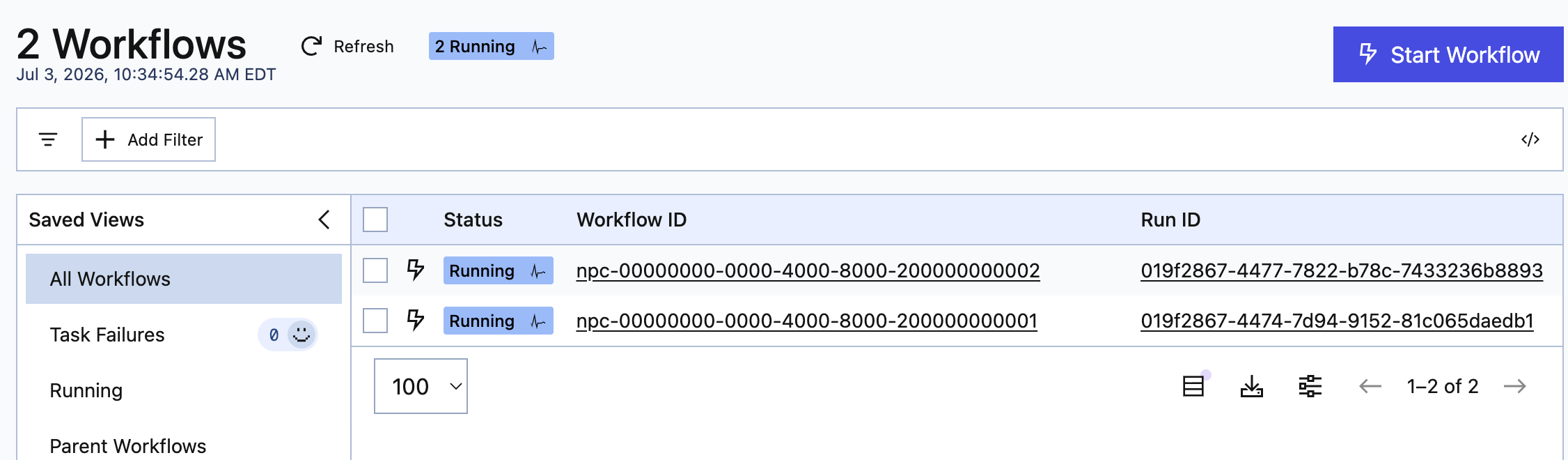
Once the first sweep has been performed, I should now see a workflow for every NPC in my game. It happens that in my current set of test data, the game only has 2 NPCs.
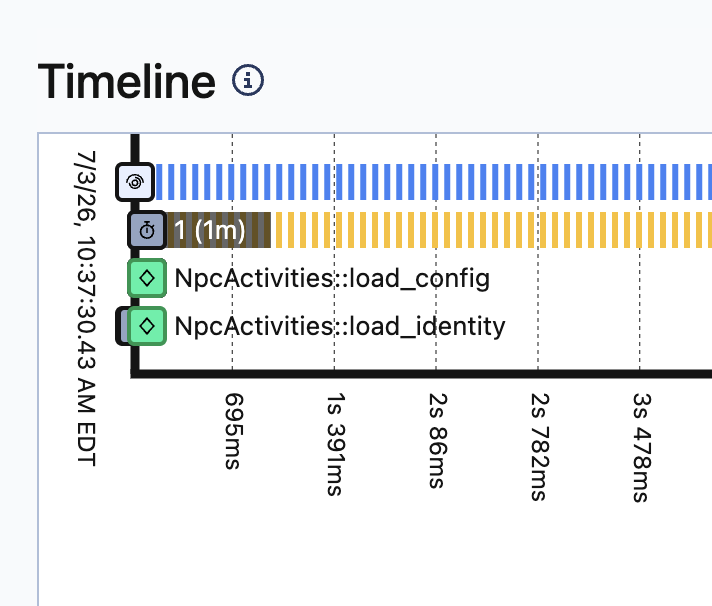
When I drill into an NPC’s workflow using Temporal’s console, I can see the set of activities that run at the beginning of the workflow and never run again. This is where it fetches configuration and the lore identity.
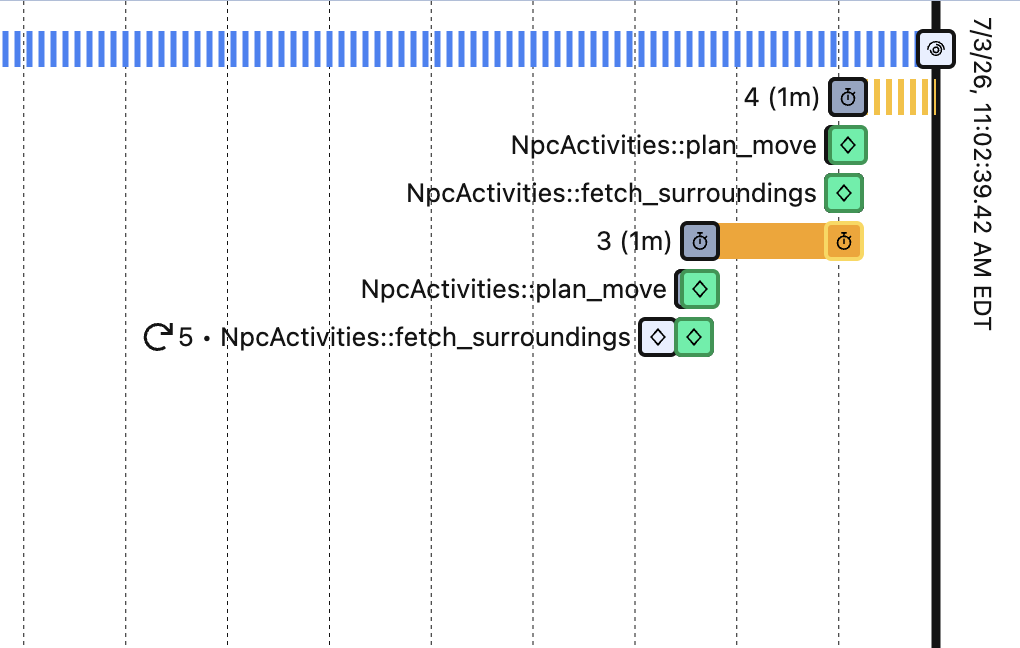
I can then look 60 seconds down the timeline in the console and see the activities from the preceding screenshot. This is the NPC using a planner agent activity to decide on a plan of action. This plan gets sent back to the Phoenix application via secure API. The decision result is very simple at this early milestone:
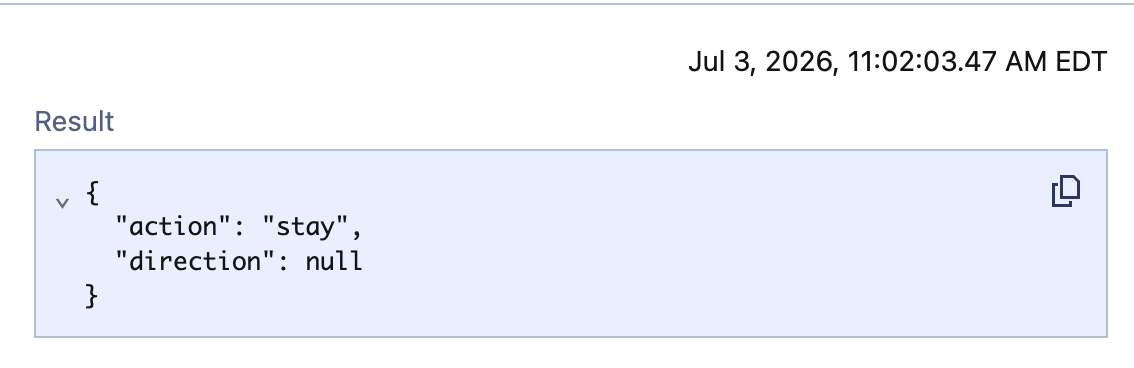
Here the NPC has made a decision to do nothing. This is important because in the workflow logs I can see that the reason the NPC isn’t moving is because it doesn’t want to, and not because something is wrong. If an error occurs in workflow execution, that shows up in these logs as well.
Taking a step back to look at this at a high level, it’s pretty freaking cool. I don’t have to write the resilient GenServer code to sleep and wake processes and maintain their state across crash. I can, because OTP is better than sliced bread, but I can also delegate all of that to Temporal and I get to write my NPC brains in Rust, which is a bonus.
When I go to deploy Agentic Realms on real infrastructure so real players can connect to it, I just have to deploy the Rust binary with the Temporal workflow. I can even bundle that binary with my OTP release if I really wanted to, but it’s just as easy to run the binary in a super tiny VM.
Because I used event sourcing, the brain integration was brain-dead simple. When an NPC activity decides on an action, it just sends that to the web API as a command, the same command that the game internals would publish if they were controlling the NPC. If the command is valid, the NPC moves and nobody has to know the decision logic was outside the app. I’ve even got code that will retry the command publish (basically an optimistic concurrency check) if the NPC is no longer in the expected room when the command carrying a direction arrives.
Footnotes
I’ll eventually add a feature that sends a signal to the workflow to tell it to reload recently changed metadata like lore and description. ↩